
To begin entering CBC data on the web, navigate to the Christmas Bird Count portal (https://naturecounts.ca/nc/cbc/main.jsp), then on the top menu, select Data Entry > Submit Data.

Data entry begins with the Checklist Setup. At the top of the screen, select the date, start time, and end time for your checklist. The duration will be calculated automatically.
You’ll also need to select a protocol for your checklist. For the Christmas Bird Count, there are three protocol options:
- Field Count – Use this for regular daytime birding that is not at a birdfeeder.
- Feeder Count – Use this for stationary counts at birdfeeders.
- Nocturnal Count – Use this for dedicated nocturnal birding or owling (i.e., birding that is before sunrise or after sunset).

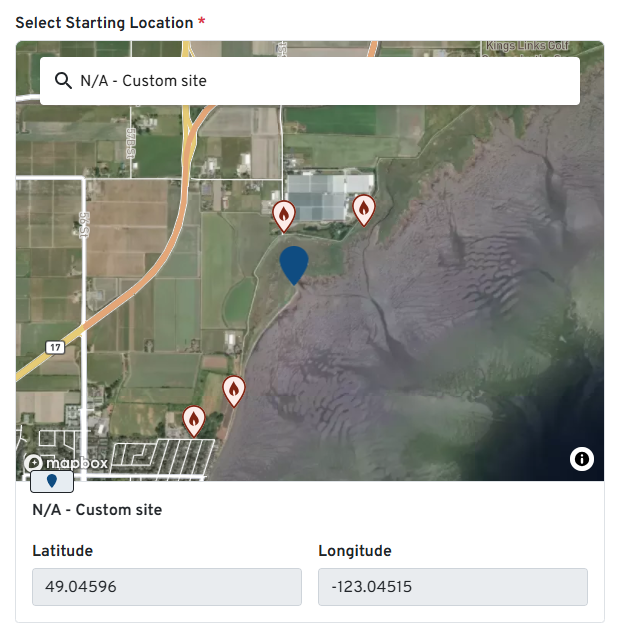
Next you will need to select your location. The map displays all Christmas Bird Count areas as yellow circles. Navigate to your circle, then locate the area in which you were birding. The map displays eBird hotspots, so you may select the relevant hotspot if there is one. If there is no eBird hotspot, just click the map to select your location.
When you select a location on the map, the latitude and longitude boxes will be automatically populated. If you have coordinates for your birding location, you can do this procss in reverse – enter the latitude and longitude, and the location will be automatically selected on the map.
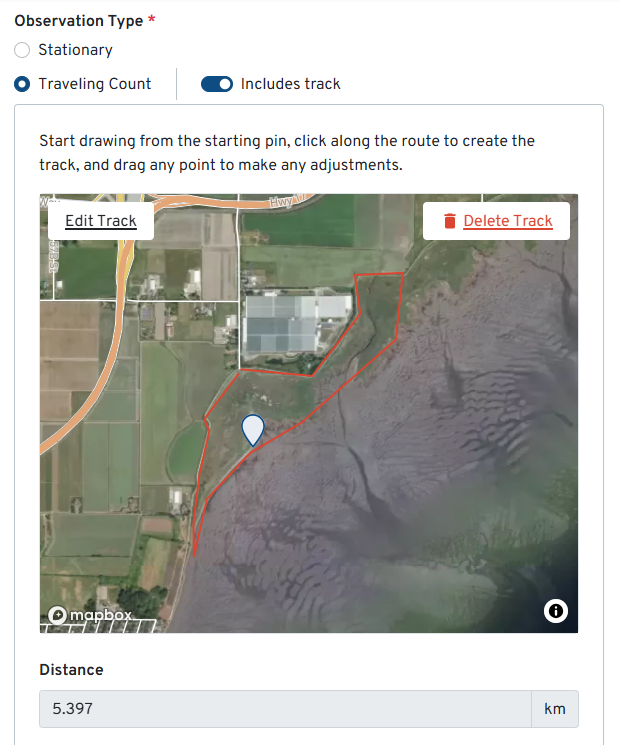
Next you will select whether you conducted a Stationary Count (where you stayed in one place) or a Traveling Count. If you select Traveling Count you will need to enter the distance you covered. You can do this either by simply entering the number of kilometers, or by drawing your route (or track) on a map. To draw your route, click the toggle labeled ‘Includes Track’.
Clicking the toggle opens a map. Find your birding location on the map, then click the map to start drawing your track. Each time you click you create a new point along your track. If you need to start over, click ‘Delete Track’ and start again. When you are done drawing your track, click ‘Done Editing’. Your distance covered will be automatically calculated.
Finally, indicate the number of observers in your party and whether you’re submitting a complete list of all the birds you observed and identified, then add any comments you feel are relevant. Click ‘Species List’ at the bottom of the screen to move to begin adding your observations.
Next section: Species List